Practical guide
Which reader fits your process: handheld or a fixed read point?
An RFID reader, an RFID scanner and an RFID handheld all read data from tags. The difference that counts is where the read event sits. Does an operator take a handheld to the object, does the object come to a scan station, or does it pass a fixed reader? This guide compares those four formats on application. If you are after models, specifications or a price, those are on the hardware pages linked at the end.
Tom van LeeuwenReading time about 9 minutesStatus: technical selection guideUpdated on 22 September 2026
4
Reader formats that change how the process works
3
Questions that narrow the choice to one setup
0
Line of sight required for passive UHF RFID
1
Reliable business event for ERP or WMS

Search for an RFID reader and you will find rows of devices compared by power, frequency, connections, and maximum read distance. It looks like a product comparison. The actual decision starts one step earlier.
Where in your process do you need to know that an object is present?
During a stock count, the operator moves toward the inventory. At a dock door, inventory passes a fixed location. At a packing station, a box is deliberately placed in a scan bin. During a search, one specific tag must be found among hundreds of others.
Four situations, four different read events. Trying to solve all of them with the same device usually means buying too much hardware while manual work remains.
The answer in one paragraph
Choose a handheld when the operator goes to the object. Choose a desktop reader or scan bin when the object is deliberately brought to a workstation. Investigate a fixed read point when goods always pass the same doorway. Only then should you select a brand, power level, and connections.
Reader or scanner: what do the terms mean?
The terms are used interchangeably
In everyday use, RFID reader and RFID scanner often mean the same thing: equipment that uses radio waves to receive data from an RFID tag. Reader is the common technical term. Scanner emphasizes the action and is often used for a handheld.
The name is not important to the selection. The device format and its place in the process are.
How it differs from a barcode scanner
A barcode scanner usually reads one visible code that an operator aims at. A passive UHF RFID reader can read multiple tags without every tag being visible. The reader sends energy through an antenna. The antenna in the tag captures part of that energy, activates the chip, and sends a response.
That makes quantities fast to read. It also makes the read zone less obvious. A barcode that is not targeted will not be read. An RFID tag outside the box may still respond. That is why “How far does it read?” is rarely the best first question. “Where must the read zone stop?” is usually more important.
Four reader formats compared
| Reader format | The read event | Strong at | Honest limitation |
|---|---|---|---|
| RFID handheld | An operator walks to the objects | Counting, finding, checks, and exceptions | A deliberate operator action is still required |
| Desktop reader | An object is presented at a workstation | Receiving, issuing, programming, and small quantities | An open field is less suitable for a full box |
| Fixed reader or RFID gate | An object passes a fixed location | Automatic events at doors, lines, and docks | Direction and fringe reads must be resolved reliably |
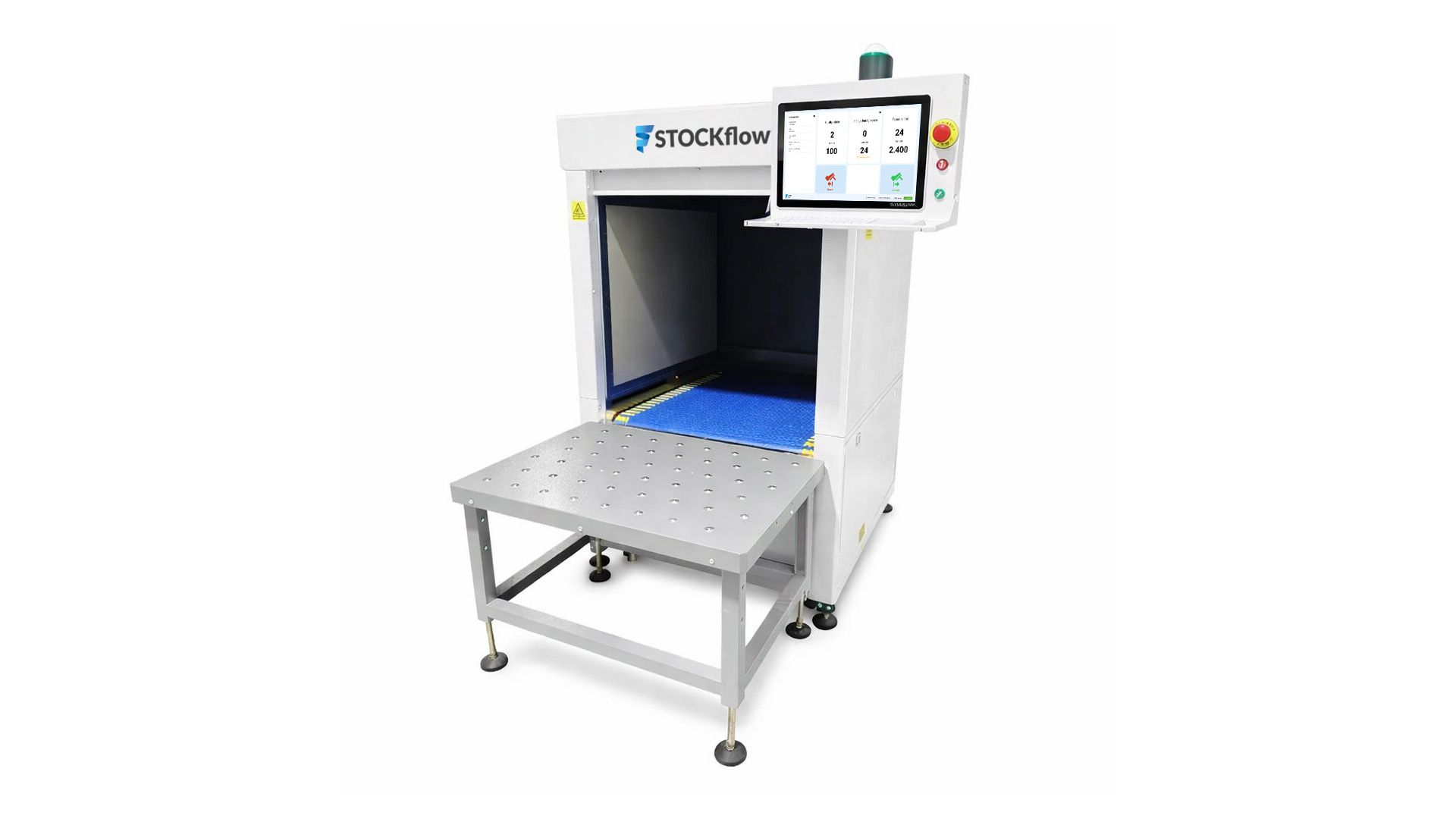
| Scan bin, cabinet, or tunnel | Objects enter a controlled read zone | Reading many tags with clear process context | The material flow must fit through or inside the setup |
Handheld: you go to the object
A handheld fits when the operator goes to the inventory. Examples include a cycle count, a rack check, or finding one specific tool.
Its advantage is flexibility. The warehouse does not need to be rebuilt, and one device can be used in multiple areas. The limitation is that a person still has to start and perform the action.
A handheld is often the best first test setup. It quickly shows whether tags read on your material, how long a round takes, and how racks, metal, and label position affect performance.
Desktop reader: the object comes to one place
A desktop reader fits a workbench, counter, or issue point. An object is placed on the reader, the event is confirmed, and the process continues.
This is controlled, but not fully automatic. An open read pad is also not the same as a shielded scan bin. To identify the exact contents of a full box, you must prove that everything being read is actually inside that box.
Fixed reader: registration during passage
A fixed reader fits when goods already pass a predictable location, such as a dock door, secure room, internal doorway, or production line.
Registration can happen without an extra scan. Automatic reading, however, requires more process design. The system must know not only that a tag was seen, but what that observation means. Did the pallet leave, arrive, or remain next to the gate for five seconds?
The reader supplies observations. Software must turn them into one reliable event.
Scan bin, cabinet, or tunnel: the field becomes part of the action
With a scan bin or cabinet, a box is deliberately placed inside a controlled space. A scan tunnel does the same while goods keep moving. The benefit is not only speed. The context is clear: these tags belong to this moment and this package.
That controlled field makes this type of setup suitable for bulk validation. A number is not enough. The complete set of unique codes should be compared with what the order says must be present.
Three questions that determine the choice
Who or what moves?
- If the operator goes to the object, start with a handheld.
- If the object comes to a workstation, consider a desktop reader or scan bin.
- If the object always passes the same doorway, investigate a fixed point or gate.
- If volume already moves on a conveyor, a scan tunnel is the logical starting point.
Do you need to identify one object or a collection?
For one object at a workstation, barcode may work perfectly well. RFID becomes more interesting when aiming, touching, or processing one item at a time is the limiting action.
For a collection, speed is not enough. You need uniqueness. A tag that responds ten times must remain one item. A tag that does not belong to the order must appear as an unexpected code rather than disappear into a total count.
Is registration deliberate or automatic?
A deliberate action has context: the operator has opened an order and knows which box is being checked. An automatic passage lacks that human context. The setup must determine direction, time window, and read zone by itself.
The less the operator does, the more the system must understand.
From process requirement to useful shortlist
A useful shortlist is not three readers with similar specifications. It contains one or two reader formats that demonstrably fit the process. Define four kinds of requirements first.
Describe the required outcome
Write down what the system must be able to say after one read event. Not “the tags were read”, but for example:
- these 36 items belong to order 8142;
- tool A is in compartment 12 and tool B is not;
- pallet 103 left at 2:32 p.m.;
- the box contains one unexpected product and is missing two expected products.
This outcome shows whether you only need identity, or also direction, quantity, location, and comparison with an order. That determines how much context the reader setup and software must supply.
Record the object and environment
Document material, dimensions, packaging, stacking, and the possible tag positions. Do the same for the environment: metal racks, people in the field, nearby tagged stock, available mounting points, and movement speed.
This prevents a common mistake. Two readers can show the same range on paper and perform very differently in the same room because the antenna, tag position, and reflections create the real read zone.
Decide how much operator action is acceptable
A handheld requires an operator to start the round. A scan bin requires someone to present a box. A gate can work without an extra action, but needs more logic to determine direction and fringe reads.
There is no free automation. Less work on the floor usually means more design work in field control and software.
Define the integration as an event
Complete one sentence for ERP or WMS: “When this read event is valid, we record …”. The ending might be received, moved, complete, issued, or shipped. If that sentence cannot be completed yet, choosing hardware is premature.
A practical acceptance requirement
A reader has only been selected when the full action succeeds under normal working conditions. That means not only reading every intended tag, but also preventing tags outside the zone from causing a false transaction and presenting an exception to the operator in an understandable way.
Where reader projects fail in practice
Selecting for maximum range
Reading farther is not automatically better. At a doorway, tags on the adjacent rack must often be excluded. Maximum range is a laboratory number. Usable range is a process decision.
Treating the tag as an afterthought
The reader and tag form one system. A good reader with the wrong label on metal remains a poor setup. Material, shape, placement, and orientation determine how much energy reaches the tag and how strongly it responds.
Testing only in a meeting room
Cardboard, metal, liquid, object position, and walking speed all change the result. A tabletop test proves that the technology works. A floor test proves whether your process works.
Sending raw reads directly to ERP
A reader can see the same tag many times in a short period. ERP or WMS usually does not want radio observations. It wants a transaction: received, moved, issued, or shipped. Software between the two must filter, validate, and add context.
Test the choice without committing to a rollout
Select one recurring action
Do not start with the entire warehouse. Select one count, receiving point, issue process, or doorway where time or accuracy is currently being lost.
Establish a baseline
Measure how long the action takes, how many people are involved, and which errors or recovery actions occur. Without a baseline, a faster demonstration is only an impression.
Test with your own objects
Use the boxes, carts, tools, or products that actually move through the process. Include the difficult variations: metal, liquid, stacked objects, and different labels.
Introduce exceptions deliberately
Place one wrong item in the box. Remove one label. Put a tagged object next to the read zone. Walk through a gate in both directions. A good test tries to make the setup fail before operators depend on it.
Measure again and reach a go or no-go
Compare the same action under comparable conditions. Measure speed, reliability, recovery work, and the quality of the transaction sent to ERP or WMS.
Use predefined acceptance criteria
Without limits, any demonstration can be labeled a success afterward. Define the minimum result before the test. Consider:
- the percentage of intended tags read within the available time;
- the number of tags outside the zone included incorrectly;
- the time from presenting goods to a clear green or red result;
- the operator actions that remain;
- behavior during a network or integration outage;
- the time required to resolve an exception.
The exact threshold varies by process. During a search round, one missed tag may justify approaching a compartment again. During automatic shipping, a false transaction may be unacceptable. The consequence of the event determines the requirement, not a generic percentage from a brochure.
Compare total process cost, not reader price
A handheld may look more expensive as a device than a simple fixed reader, but it can start without mounting and infrastructure. A fixed gate can remove actions entirely, but needs antennas, shielding, installation, and more software logic.
Include tags, antennas, mounting, accessories, device management, software, integration, training, and support. Compare that total with measured labor savings, error reduction, and avoided recovery work. That is a comparison of solutions rather than boxes of electronics.
Frequently asked questions
What does an RFID reader cost?
The device price says little about the total investment. Tags, antennas, mounting, software, network, and the ERP or WMS integration all count. Calculate cost per read event and process, not per standalone device.
How far can an RFID reader read?
It depends on frequency, antenna, permitted power, tag, material, and environment. Passive UHF RFID can exceed ten meters under favorable conditions. A reliable setup limits range to what the process requires.
Can one reader read hundreds of tags at once?
Yes. UHF RFID is designed to inventory multiple tags quickly. Whether every tag reads reliably depends on position, shielding, spacing, and the read field.
Can an RFID reader read through boxes?
Often through cardboard and plastic. Metal and liquids can disrupt the signal significantly. That is why the real product and packaging must always be tested.
Can an RFID reader connect directly to our ERP?
Yes, but do not send every raw tag response. Software should first determine which observation is a valid business event and only then send the transaction to ERP or WMS.
When is barcode the better choice?
If every object is already handled separately, the code is visible, and quantities are low, barcode may remain simpler and less expensive. RFID becomes valuable when aiming, touching, or processing one item at a time is the constraint.
In conclusion: buy a read event, not a device
The best RFID reader is not the reader with the greatest range or the most connections. It is the reader that creates a reliable observation at the right moment without adding another action to the process.
Sometimes that is a handheld. Sometimes it is a fixed gate. Sometimes it is a shielded bin. And sometimes the honest outcome is that barcode remains sufficient.
The sequence is always the same: choose the process, define the read event, test the material, and only then select the hardware.